The button and the photo use the same Amazon link. If you buy through it, we may earn a commission. The price shown there is the live price.
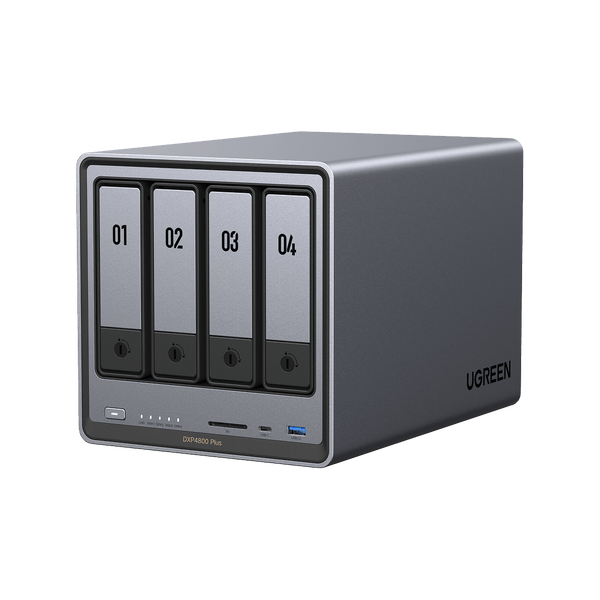
The UGREEN NASync DXP4800 Plus is a four-bay network-attached storage box for a home or a small office. It is the “Plus” model, which is a different machine from the plain DXP4800. Black Friday listings shorten both names to “UGREEN NAS” and hope the bay count is enough. Bay count is not enough. The processor, the network port, and the memory are the difference, and the drives are usually not in the box.
UGREEN DXP4800 Plus Black Friday Deals 2026: The Plus, Not the Base
The DXP4800 Plus is a four-drive NAS. UGREEN built the Plus on an Intel Pentium Gold 8505, with 8GB of RAM that can be upgraded, two M.2 slots for cache or fast pools, and a 10-gigabit Ethernet port in addition to slower Ethernet. Those are the parts that earn the Plus name. The non-Plus DXP4800 is a four-bay box with a weaker CPU and without that 10-gigabit port. It can be the right cheaper-featured machine for a light file share. It is not this machine. HDMI output on the Plus means you can plug in a monitor for setup or for a simple local console. It does not turn the NAS into a gaming PC.
The operating system is UGREEN’s UGOS. It is not Synology’s DSM and it is not TrueNAS unless you deliberately replace it, which is a project, not a default. Buy the Plus if you are willing to live in UGOS and its app set. Do not buy it because a forum said any four-bay box can pretend to be a different brand’s NAS. Apps, phone backups, and shared folders are the jobs it is built for. Confirm the current app list on UGREEN’s page if you need a specific backup client or a media server. Software moves. The Pentium and the 10-gigabit port do not.
Drives are sold separately on most listings. A four-bay chassis without disks is an empty shelf. Hard drives for a NAS should be drives rated for that use, not the cheapest desktop disk in a Black Friday bin, if you care about a pool that stays up. Solid-state drives for the M.2 slots are also separate, and they are optional. You can start with hard drives only. You cannot start with no drives and expect the photos to have somewhere to land.
RAID is a choice you make at setup, not a feature that arrives configured. A single disk is simple and has no protection. Two disks in a mirror survive one failure. Four disks in a larger array trade space for the ability to lose a disk. None of those layouts is a backup. A NAS in the same room as your only copy of the photos is one fire, one theft, or one bad power supply away from a sad weekend. The useful pattern is the NAS plus a second copy somewhere else, even if the second copy is a single drive at a friend’s house or a cloud account you already pay for. This page will not invent a backup plan that ignores that.
What to put in the bays, and what not to expect
Match the disks to the job. A media library that is mostly read, rarely written, can live on large hard drives. A folder of working video files wants faster disks or the M.2 slots, and it wants the 10-gigabit port connected to a switch and a computer that also have 10-gigabit. If your switch is gigabit only, the Plus will talk at gigabit. The port does not upgrade the rest of the house. A 10-gigabit switch is a separate purchase. Include it in your thinking if the port is why you chose the Plus over the base DXP4800.
Noise and placement are ordinary. Four spinning disks are audible. A closet with no airflow is how a NAS cooks itself. Put it where the fans can breathe and where you can hear a beep if it complains. A UPS, a small battery backup, is the accessory that prevents a power blink from corrupting a pool. It is more useful than a decorative sticker kit. It is also sold separately.
The RAM is upgradeable on this Plus. 8GB is enough to start a home file server. More memory helps if you will run several services at once. Buy the upgrade only when you know you need it. The CPU is a low-power Intel part, not a workstation. Plex-style transcoding of many streams is a load to research against this specific chip before you promise the household four simultaneous conversions. Direct play, where the TV understands the file already, is the kinder setup.
Security is your job. Change the default passwords. Do not expose the admin page to the open internet because a guide made it sound easy. Use the vendor’s remote-access method if you need files away from home, and turn on two-factor authentication if UGOS offers it on your version. A NAS full of family photos is a target. Black Friday does not configure the firewall.
Black Friday buying advice
Require the title to say DXP4800 Plus, not DXP4800, not a two-bay DXP2800, and not a bare drive enclosure with no CPU. Then read the line about disks. If it says diskless, you still need to buy drives. If it says disks are included, read the capacity and the drive model. A bundle of four unknown disks is not automatically a better NAS. A bundle of four decent NAS hard drives can be, when the model numbers are printed.
Compare the Plus with the base DXP4800 on features only: the Pentium 8505, the 10-gigabit Ethernet, the RAM, and the M.2 slots. If you will never use 10-gigabit and you do not need the stronger CPU, the base unit may be the coherent machine. This page does not call the Plus the cheap one or the base the cheap one. It calls the Plus the one with those ports and that processor.
Renewed or open-box NAS units should be tested with at least one disk you can afford to erase. Confirm the fans spin, the 10-gigabit port links to your switch, and UGOS installs or boots. A dead Ethernet port is the whole product failing. Return it inside the window.
Ignore listings that are only a tray, a power adapter, or a stack of drives “for UGREEN.” Those parts are real. They are not the DXP4800 Plus. Also ignore a fixed discount. There is not one on this page. The live listing is the offer. The empty bays are the follow-up purchase you should already have planned.
Before you check the live offer
Buy the DXP4800 Plus if you want UGREEN’s four-bay Plus specifically: Pentium Gold 8505, 8GB to start, 10-gigabit Ethernet, and M.2 slots, and if you are ready to add your own drives and a real second backup. Buy the plain DXP4800 if you compared the ports and you do not need the Plus. Buy a simpler external drive if you do not actually want a small server humming in a closet.
Black Friday is a sensible week to get the chassis after the drives are also in the plan. It is a bad week to come home with an empty four-bay box and no disk to put in it. Open the listing, read Plus, read whether drives are included, and then look at the live offer.