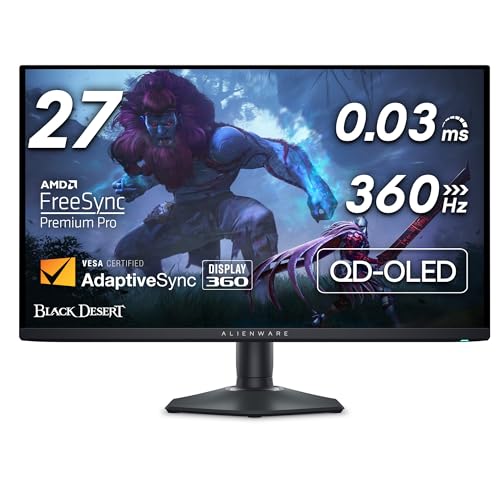
The Alienware AW2725DF is a 27-inch QD-OLED gaming monitor. The letters at the end matter. DF is this model: a 2560 by 1440 panel, a 360 Hz refresh rate, and Dell’s claimed 0.03 millisecond gray-to-gray response. It is not a 32-inch Alienware OLED, and it is not a 4K IPS monitor that shares the AW2725 prefix in a different suffix. Black Friday grids love a shared prefix. The product here is the AW2725DF.
QD-OLED is the panel type. You get the contrast of an OLED with a quantum-dot layer, which is why these monitors are talked about for both dark games and bright highlights. The resolution is QHD, 2560 by 1440, not 4K. At 27 inches that is a sharp desktop. It is the wrong monitor if you need a 4K canvas for video timelines. The refresh rate is 360 Hz. To see that rate you need a graphics card that can drive it at the settings you play, and a cable and a port that can carry it. The monitor will still work at a lower refresh. You do not get 360 Hz from the panel alone if the PC cannot feed it.
Dell lists HDMI 2.1 and DisplayPort 1.4 on this model. Use the port your PC actually has. Adaptive sync is part of the gaming pitch: NVIDIA G-SYNC Compatible and AMD FreeSync Premium Pro are the kinds of labels this class of Alienware carries. Confirm both names on the spec sheet of the exact listing, because a renewed or region-specific box can be described loosely. HDR on a monitor like this is DisplayHDR True Black class rather than a bright mini-LED television. OLED highlights look vivid in a dark room. They are not a 65-inch TV’s full-screen brightness. That is a category difference, not a defect.
The stand is height adjustable, with tilt and the usual swivel and pivot of a monitor in this line. Check the listing for the stand. Some “panel only” or open-box deals remove it. A VESA mount is the backup plan if you have an arm. The power brick and the cables should be in a new box. OLED panels can retain static images if you leave the same bright element up for long stretches. Dell’s OLED care features exist for that reason. They are not optional trivia. Turn them on and let the monitor run its maintenance cycle.
Burn-in warranties on OLED monitors vary by brand and by year. Read Dell’s warranty text for the AW2725DF rather than a forum memory of a different Alienware. A renewed monitor may have a shorter warranty from the reseller. “Alienware” in the title does not mean “Dell’s new-monitor OLED coverage” if the seller is a third party.
Desk setup is part of the product even though it is not in the box. A 27-inch panel at QHD wants a viewing distance of a typical desk, not a couch across the room. OLED black levels show dust and a bright window behind you more than a matte IPS does. A hood is optional. A bias light behind the monitor is a comfort choice, not a requirement. What is a requirement is a graphics card with a port that can drive 1440p at a high refresh. An older card with HDMI 2.0 will light the panel and then stop well short of 360 Hz. Know that before you blame the monitor.
Who it is for is a desktop gamer who wants a 27-inch QHD OLED at a very high refresh and who sits close enough for 1440p to look dense. Who should look elsewhere is someone building a console-only living room, where a TV size and a TV operating system matter more, or someone who needs the extra pixels of 4K. A Black Friday TV deal and this monitor are not substitutes.
Alienware AW2725DF Price Black Friday Deals 2026: What to Confirm Before You Buy
Confirm the full model name AW2725DF, the panel size, and the box contents.
The spec block should say 27-inch, 2560 by 1440, QD-OLED, and 360 Hz. If it says 4K, 32-inch, or IPS, leave the page. If it says AW2725 and drops the DF, ask the seller to photograph the label on the back of the panel. That label is the identity. Color of the Alienware shell is cosmetic. The suffix is not.
Cables matter at this refresh. A new box should include the video cables Dell packs and the power supply. If you will use HDMI 2.1 from a graphics card or a current console, confirm the included HDMI cable is the one you will actually use, or plan on your own cable of the right spec. A pretty cable from a bargain bin can be the reason a 360 Hz monitor looks like a 60 Hz monitor.
Black Friday open-box monitors are common. OLED open-box deserves a slower read. Ask about hour count if the seller can see it, about visible marks on the panel, and about whether the warranty transfers. Dead-pixel language should be the maker’s policy, not a chat message that says “OLED has quirks.”
When it arrives, inspect the panel in a full white and a full black image before you install every app. Set the refresh to 360 Hz in the operating system, turn on adaptive sync, and update the firmware if Dell has one for this model. Give the panel a few days of normal use with the care features enabled before you judge a new OLED’s uniformity in the first hour.
Keep Dell’s cable bag. Replacements get guessed wrong at this refresh rate, and a random HDMI lead is a common reason a new panel never shows its real mode. The AW2725DF is one specific monitor: 27-inch QHD QD-OLED, 360 Hz, in the Alienware stand Dell sells with it. Black Friday is a fine time to shop that monitor and a bad time to shop a similar name. Match AW2725DF on the label, then look at the rest of the offer.